Saturday, 3 December 2011

Battery Saver 1.3


Requirements: Android
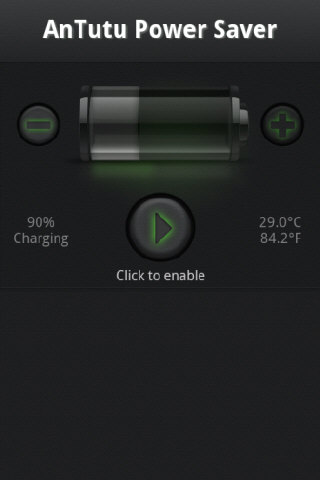
Overview: More Power, More Battery. AnTuTu Battery Saver is a power saving for Android phones.

More Power, More Battery
AnTuTu Battery Saver is a power saving for Android phones, you don’t know what costs of electricity, turn on the 1-3 profiles open power-saving mode, the software will automatically open you want to the power intensity, we directly reduce the cpu power down. (need root)
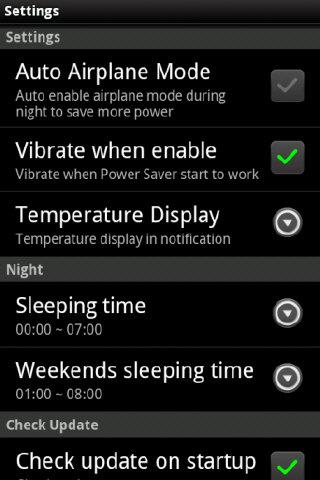
To maintain normal for 2 days in order to know is truly your saving power of the software, you can set your sleep time, in order to better saving electricity.

What’s in this version:
v1.3
Add battery use menu item.
Add Root Tool button.
Change saved level computing method.
Friday night is the weekend not Sunday night.
Fixed crash on android version 2.0 and 2.0.1.
download

Tuesday, 29 November 2011

Gallery Lock Pro 2.2.3 for android


Gallery Lock Pro

Current Version:2.2.3

Requires Android:2.2 and up

Size:1.2MB

V2.2.3 update:

support Multi Select(2011.11.22)

Hide your privacy pic/videos.

Google Market Top50 MUST HAVE Application.

Privacy protecting application that hides individual photo/video with password!

* Feature
- Manage photo by folder.
- Supports photos and videos.
- Easy link to existing gallery application
- Can hide the launch icon and run app by dialing
- Delicate design
- pincode,pattern password supports.

* After checking that the Lite version to work correctly is recommended to purchase.

* Be care to remove lite version without unhiding all pics/video. If you do that, you will lost pics/video.
But you can recover missing files by re-installing and tap GL > Setting > Recover.

* “outgoing call”permission is needed for Stealth Mode

* After purchase, please leave a comment(expect 5star)

* If app is crashing, so you can’t open it, follow below steps to recover it.
1) Uninstall Gallery Lock
2) Download Gallery Lock from the market and install it.
3) Go Setting in the application, Click “Find/Recover Missing files”
4) missing files will be recovered to /mnt/sdcard/DCIM/recover
5) run Gallery Lock.

* When you lost pics/vids.
May be you uninstall without un-hiding pics/vids.
This cause missing files. I warned this risk on the notice.
But, There is a solution. following below steps.
1. Run Gallery Lock
2. Go Setting
3. Click Recover & Find Missing files.
4. Go recovery directory and get missing files.

MX Video Player Pro 1.4c


MX Video Player Pro

Requirements: Android 2.1+
Overview: The best way to enjoy your movies !

MX Video Player is the first Android video player that performs multi-core decoding. According to the test results on dual-core devices, it shows up to 70% performance improvement than single-core devices.

CPU OPTIMIZATION – Provides highly optimized CODECs and Rendering Engines for the processors including ARM® NEON™ and NVIDIA® Tegra™ 2.
MULTI-TOUCH VIDEO ZOOM CONTROL – Zoom while playing your video in and out using multi-touch gestures.
SUBTITLE SCROLL – Scroll on subtitle text and playback position will be adjusted to match previous or next subtitle timing.
BETTER SUBTITLE READABILITY – Increased subtitle readability with thicker border and shadow around text.
FULL HONEYCOMB SUPPORT

Supported File Types :
-SubRip(.srt)
-Sub Station Alpha(.ssa/.ass)
-MicroDVD(.sub/.txt)
-SubViewer2.0(.sub)
-SAMI(.smi/.sami)
-MPL2(.mpl/.txt)
-PowerDivX(.psb/.txt)
-TMPlayer(.txt)
-Matroska (.mkv) Subtitle Track. (text, ass/ssa only)

What’s in this version : (UPDATED:November 25, 201)
-Android 4.0 (Ice Cream Sandwich) support.
-Added option to select S/W decoder separately for network play.
-Improved thumbnail extracting algorithm.
-Display more information on video propery window.
-Fixed some no response error when leaving playback screen.
-Fixed screen turning off problem when looping playback.
-Fixed some audio sync mismatch.
-Fixed some playback issue of variable bitrate video.
-Fixed rendering quality problem of Mpeg2 TS video.

WiFi Manager Premium 2.1.5 for android


WiFi Manager 1WiFi Manager 2


Requirements: 1.6 and up
Overview: Find, connect, manage WiFi networks. Improve connection quality with a graphical channel radar. Discover open networks around you.

Includes two home screen widgets: one displays detailed connection info, the other lets you switch among your favorite networks with a single tap.

New and improved:
• Better graphics, including a dark color theme;
• Assign your own descriptions and icons to individual WiFi networks – never forget what that “XYZ1234″ network is;
• Switch among your favorite networks with a single tap by using the WiFi Network Switcher widget. It will even enable WiFi if needed.
• Automatic switching between fixed and dynamic (DHCP) IP addresses (Android Settings can’t do this);
• Still there – support for tablets in landscape mode.

What’s in this version:
2.1.5:
Added a compatibility setting to switch IPs early: may be needed for some routers and/or devices.

Note: Enabled premium functions.
These features are: advanced per-network options (desciption, icon, IP address) and the one-tap network widget.
All the other – essential – features are free: the black widget with detailed connection info (both sizes), scanning and connecting to networks, the network list view, the network signal radar.
Download WiFi Manager Premium v2.1.5 apk

Monday, 28 November 2011

Remote Web Desktop Full 5.6.3 for android


Remote Web Desktop Full

Requirements: Android 1.5+
Overview: The Best Web Desktop for Android phone!

The most powerful web desktop for Android phone, the top 10 hottest apps on AppBrain. It provides web-based access to your phone from the comfort of your PC or laptop. It works via a WiFi or USB connection, and some 3G connections.

★ Features
─────────────
✔ Web SMS: send, read and manage messages in browser. Support long SMS, mass-messages and fake SMS.
✔ File Explorer: manage SD card files and transfer files between phone and computer. Support multiple upload by drag-and-drop (for HTML 5 browser), image viewer, Media Player, etc.
✔ FTP Server: provide a high speed channel to transfer files between phone and computer, enable you to manage sdcard files in Window(s) File Explorer, browser or FTP client.
✔ Remote Control: remote control your android within your computer. Including mouse & keyboard emulation.
✔ WiFi Keyboard: allow you to type on your phone using your computer’s keyboard.
✔ Webcam: turns your phone into a wireless camera, view your camera with web browser (For 2.2+)
✔ Screen Capture: capture phone screen from web (for rooted phone)
✔ Shared Clipboard: share clipboard text between PC and phone.
✔ Wallpaper: set phone wallpaper by upload a picture or online picture.
✔ APK Web Installer: backup apps to SD card, and install APK through File Explorer of web desktop.
✔ Personal Web Server: serve your personal web pages on your phone.
✔ SSL HTTP: provide 512 bits RSA encrypt
✔ Network Bridge: support all ineternet connections (2G/3G/WiFi), access your phone at any place.
✔ Many new features are coming soon.
Remote Web Desktop Full

What’s in this version:
-Support multiple files download for Firefox, Chrome, Safari browsers

Download Instructions:

Launcher 7 – Donate 1.0.1.21.2 for android


Requirements: Android 2.1+
Overview: A Window(s) Phone 7 style launcher for Android.

Unlike other current WP7 launchers (Window(s) Phone Android, Metro UI), this one allows you to properly modify your start screen. Just long press on a tile and drag tile where you want!

Features:
- Ad-free
- 1×1, 2×1 and 1×2 tiles.
- tile bitmaps can cover the whole tile
- widgets on tiles
- tile reordering
- live contacts tile

TODO-list:
- configurable animation parameters (soon)
- clock tile of sorts
- more animated tiles
- facebook integration

What’s in this version:
-Animated contact tile now uses now-deprecated API to locate contacts
-Several bugs fixed from tile animation system
-Changed fly animation to be more wp7-like (you may need to adjust animation speed for best results)
Download Instructions:
http://www.filesonic.com/file/3973858554
Download Launcher 7 - Donate v1.0.1.21.2 apk

Gallery Lock Pro 2.2 for android


Gallery Lock Pro

Requirements: Android OS 1.6 +
Overview: Hide your privacy pic/videos.

Privacy protecting application that hides individual photo/video with password!

* Feature
- Manage photo by folder.
- Supports photos and videos.
- Easy link to existing gallery application
- Delicate design
- pincode,pattern password supports.

* After checking that the Lite version to work correctly is recommended to purchase.
* Be care to remove lite version without unhiding all pics/video. If you do that, you will lost pics/video.
* After purchase, please leave a comment(expect 5star)
* If app is crashing, so you can’t open it, follow below steps to recover it.
1) Uninstall Gallery Lock
2) Download Gallery Lock from the market and install it.
3) Go Setting in the application, Click “Find/Recover Missing files”
4) missing files will be recovered to /mnt/sdcard/DCIM/recover
5) run Gallery Lock.
Gallery Lock Pro

What’s in this version:
v2.2 : support Multi Select(2011.11.22)

Twitter Delicious Facebook Digg Stumbleupon Favorites More

 
Design by Free WordPress Themes | Bloggerized by Lasantha - Premium Blogger Themes | Best Web Host