Sunday, 20 May 2012

Camera FV-5 v1.17 (paid version) android APK


Tailored to enthusiast and professional photographers, with this camera application you can capture the best raw photographs so that you can post-process them later and get stunning results. The only limit is your imagination and creativity!

Features :
All photographic parameters are adjustable and always at hand: exposure compensation, ISO, light metering mode, focus mode, white balance and program mode.
DSLR-like viewfinder display: see exposure time, aperture and stops display with EV and bracketing settings.
Full fledged exposure bracketing: from 3 to 7 frames, unlimited stops spacing, plus custom EV shifting.
Built-in intervalometer: make stunning timelapses (even bracketed/HDR timelapses) and time-controlled picture series.
Program and Speed-priority modes.
Long exposure support: take beautiful night photos and light trails with long exposure times up to 60 seconds*.
JPEG as well as RAW (PNG) image formats for lossless photo capturing, perfect for post-processing.
EXIF and XMP sidecar metadata support.
Self timer for delayed shooting.
Autofocus, macro, touch-to-focus** and infinity focus modes, plus a focus lock switch (AF-L).
In background photo developing and processing allows a smooth, uninterrupted camera operation.
This camera application completely avoids scene modes, instead you get full manual control over all photographic parameters, just like you do with a reflex camera, so you can ultimately control every aspect of the picture, and leave the post-processing to the computer. So after your DSLR, you will never miss a photo opportunity again, being able to capture it with the closer sensation to your DSLR as possible.

What's in this version: (Updated : May 20, 2012)
New: custom assignable function to volume keys. You can assign shutter/focus, exposure compensation (EV), ISO, white balance color temperature and bracketing settings to volume keys.
New: light metering mode redesigned. Now over 200 phone models are supported, and the number will increase with every update.
Fixed: zoom issues with camera drivers reporting wrong focal lengths.
Required Android O/S : 2.2+

Download

MediaHouse-Pro UPnP / DLNA v1.2.5 (paid version) android apk


Stream music, videos, movies and pictures from PC, NAS or any other device running UPnP/DLNA compliant media server. MediaHouse Pro powers your device i.e. phone, tablets or google TVs with the following capabilities:
Automatic scan of your home network over Ethernet or Wifi to identify PC, NAS or any other device running UPnP/DLNA media server.
Shows capabilities of the scanned servers by dividing them into two categories, one from which you can serve content i.e. called Play From and others to which you can play that content i.e. called Play To.
Use MediaHouse Pro as a browser, player or controller.
MediaHouse Pro can control playback of content from a Media Server (called - Play From) to a Media renderer (called - Play To).
Favorites - Save albums and folders from multiple media servers while browsing
Play lists - add, delete, rename music play lists. Last played audio tracks are automatically saved.
Remembers your server selection and uses it in subsequent runs.
Has a built in music player and photo album viewer.
Video play in NOT BUILT IN and MediaHouse uses other applications installed on your device. We recommend installing MXPlayer or BSPlayer, Moboplayer etc... They have support for many HD video file formats.
Support for Landscape mode
Displays album art and album thumb nails
Further Tips are available via menu option
And of course help is just and email away at android.mediahouse@gmail.com. Please contact us for any issues or even features that you would like.

UPnp/DLNA Servers
TwonkyMedia server
MediaTomb
TVersity
Serviio
Windows Media Player 12
XBMC
Synology DSM 3.1
MediaTomb
MiniDLNA
PS3 Media Server (Is slow to respond, but DOES show up)
UPnP/DLNA Players
Windows Media Player 12 (Has good audio and video support)
Sony Network Media Players (Good audio but limited support on video playback).
And of course your phone or tablet works as always.

Check out this article on how you can configure Windows Media Player to allow remote control : http://windows.microsoft.com/en-US/windows7/Change-settings-for-streaming-media-in-Windows-Media-Player

What's in this version : (Updated : May 20, 2012)
Search Functionality.
Favorites and Play lists get new context menu options.
Photo album comes in full view
Application Exit menu added
New clickable Now Playing Footer
Now Playing Queue gets new icon Q, remove and remove all menu options
Music Albums now show album count next to the title
New preferences added
Bug fixes
Required Android O/S : 2.1+

Download

Advanced Clock Widget Pro v0.713 (paid version) android APK


Small, configurable and battery friendly widget with digital clock and much more
On HONEYCOMB or ICECREAMSANDWICH a reboot MIGHT be needed to make the widget show up on the list (this is not my fault). Please try free version first!

Small (<100kb), fully configurable and extremely battery efficient **WIDGET** with:
Digital clock
Customizable fonts and colors (for transparent bg set alpha to 0!)
Multiple layout templates
Battery status (with time remaining)
Network operator / WiFi network name
World clock with timezone support (just add multiple widget and set manually weather/location in the options)
Current location, date and uptime
Current and tomorrow weather
Next alarm
DO NOT move to SD! Widgets are not working on SD (they will disappear at reboot!)

This version has configurable tap to launch feature for clock hours/minutes (2 different actions, PLEASE be patient when you configure it, list MAY TAKE A WHILE TO LOAD if you have many apps installed), settings save/restore and custom text areas.

Coming on next releases (stay tuned!):
More templates
2x1 sizes
What's in this version : (Updated : )
Added 5x1 widget size
Added update weather on click (pro only)
Small fixes
Required Android O/S : 2.2+

Download

BlueDUN v1.16 (paid version) android apk


It allows your phone to share wifi or mobile connection over the bluetooth channel with other devices like PCs,tablets or navigation systems. The bluetooth DUN (dial-up network) service is turned on, in order to enable the external device to access the Internet.
It supports both TCP and UDP protocols;

NO ROOTING NEEDED!!

Tested with Windows Xp/7 PCs and Mercedes Comand OnLine, Toyota Touch&Go, Tom Tom Rider navigation systems.

How to setup (only the first time):
Remove the previous pairing between your devices
Start the BlueDUN service, make the phone discoverable
Create the new pairing
Setup the DUN connection on the client device: don't care about phone number, account or dns because the app emulates only the modem behaviour but it sends/retrieves data to/from phone wifi/mobile connection!
What's in this version : (Updated : May 19, 2012)
Improved the TCP connection speed
Fixed stability issues
Repeat Internet connection test until it is available
Enhanced the compatibility with BlueVPN
Required Android O/S : 2.1+

Download

MX Player Pro v1.6e APK


MULTI-CORE DECODING - MX Video Player is the first Android video player that performs multi-core decoding. According to the test results on dual-core devices, it shows up to 70% performance improvement than single-core devices.

CPU OPTIMIZATION - Provides highly optimized CODECs and Rendering Engines for the processors including ARM® NEON™ and NVIDIA® Tegra™ 2.

MULTI-TOUCH VIDEO ZOOM CONTROL - Zoom while playing your video in and out using multi-touch gestures.

SUBTITLE SCROLL - Scroll on subtitle text and playback position will be adjusted to match previous or next subtitle timing.

BETTER SUBTITLE READABILITY - Increased subtitle readability with thicker border and shadow around text.

FULL HONEYCOMB SUPPORT

Supported File Types :
SubRip(.srt)
Sub Station Alpha(.ssa/.ass)
MicroDVD(.sub/.txt)
SubViewer2.0(.sub)
SAMI(.smi/.sami)
MPL2(.mpl/.txt)
PowerDivX(.psb/.txt)
TMPlayer(.txt)
Matroska (.mkv) Subtitle Track. (text, ass/ssa only)
What's in this version : (Updated : May 19, 2011)
Fixed frequent license checking.
Added license status display on the About screen.
Improved input lock and added the Kids Lock.
Improved headset key input handling.
Added an option to disable http/https video URL association.
Added an option to apply selected aspect ratio to all videos.
Added 'Use system default' to screen orientations.
And many more..
Required Android O/S : 2.1+

Download

Saturday, 19 May 2012

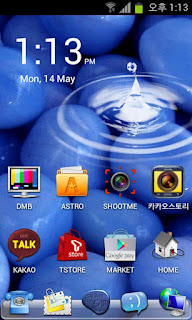
Galaxy S3 Pebbles Blue Theme v1.0 APK


Come and meet the next galaxy!
The new Galaxy S3, make the experience go launcher theme.
View seller's other applications please look at the Galaxy 3 golocker themes.

Theme manual:
Apply a theme : menu-themes-choice theme-press apply button.
Main wallpaper change : menu-wallpaper-Go wallpaper-choice one-press "set wallpaper" button.
App drawer wallpaper change : menu-preferences-visual settings-backgrounds-app drawer background-Go theme background-choice one-press set background button.
dockbar change : menu-preferences-visual settings-backgrounds-Dock background-Go theme background-choice one-press set background button.
Large icon : menu-preferences-visual settings-Icon-Icons size-Choice large icon
Icon Arrangement change : menu-preferences-screen settings-Grid size-choice one (screenshot is 5*4)
icon label Transparency change : menu-preferences-screen settings-app icon labels- choice "show labels (transparent background)"
Required Android O/S : 2.0+

Download

Phone Locator PRO - MobiUcare v52 APK


You can control your device via http://www.mobiucare.com
MobiUcare is perfect solution for keeping your smart phone from lost, misplaced, or stolen.
Protect your phone/tablet with most efficient and full featured MobiUcare!

NO Sign up required!
You can log in using existing Google account of your Android.

Feature:
SIM card change notification
Accurate phone locator
Siren
Screen lock with lost message (NEW Feature!)
Wipe out SD card (NEW Feature!)
Reset to factory setting
Take a picture from your lost phone (NEW Feature!)
Record audio from remote (NEW Feature!)
Toggle GPS/WIFI/Bluetooth remotely (NEW Feature!)
Backup call log & SMS
Push a message to phone
Control phone via SMS
Locate phone : ## locate password
Siren : ## siren password
Lock screen : ## lock password screenlockpassword
Factory reset : ## wipe password
Reset and format SD : ## wipeall password
Toggle GPS : ## gps password
Toggle WIFI : ## wifi password
Toggle Bluetooth : ## bluetooth password
Protect removal of app using password
Hide this app from app drawer (no one can find this app)
VERY LOW resource usage
It uses network or CPU resource, ONLY when you request location or some commands. So, you don’t have to worry about BATTERY consumption like other apps that monitors Android systems.
You can remotely toggle GPS to preserve battery.

EASY setup
Just click twice.
Features:
If SIM card is changed, you can be notified instantly by email.
In case of lost, misplaced, or stolen,

Step 1. Finding Phone
Ways to Find Lost, Misplaced, or Stolen phone.
Don’t worry even you lost, misplaced, or stolen your phone!!
Here is an easy way…..
Using "Find phone" feature, you can get the location of phone on map and then
Make it loud "siren" to locate your phone.
Furthermore you can get a picture from your lost phone.

Step 2. Lock screen
If you can’t find phone, you can lock your phone screen to protect your privacy and confidential data by LOCKING PHONE SCREEN command.

Also you can post lost message on your phone.
Step 3. Wipe out
Let say “there is no way to get a phone back”. You can still be safe from your privacy and confidential data by Wipe out your phone.
Basically, it will delete all the data on your phone.
Permanently, you can delete all the date on your phone by access “Wipe out” command in case you can’t get a phone back.

What's in this version : (Updated : May 11, 2012)
Preference page protection
Multiple account bug fixed
All new look and feel
ICS support
No shutter sound on ICS
Performance enhancement
File attachment bug fixed
Hide this app from app drawer
Protect preference by password
Option for sending photo/recorded file to registered Gmail
Recorded file format is changed to ogg
Winamp or media player can play it
When someone stop siren, camera takes a picture and send it to owner
Test function enhancement
Required Android O/S : 2.2+

Download

Twitter Delicious Facebook Digg Stumbleupon Favorites More

 
Design by Free WordPress Themes | Bloggerized by Lasantha - Premium Blogger Themes | Best Web Host