Tuesday, 15 May 2012

Audio Evolution Mobile v1.1.7 APK


Features:
Multitrack audio playback
Audio recording (while playing back other tracks)
Loop playback
Latency correction
Import of WAV, AIFF, FLAC, Ogg/Vorbis audio files
Import of mp3 (requires an optional download due to patents on mp3 if applicable to your country)
Mastering to stereo WAV, AIFF or FLAC file
Metronome
Fade in/out samples
Normalize samples
Each track has controls for volume, panning, mute, solo, arm, 4-band EQ, 3 insert effects and output bus selection
Unlimited number of tracks (*)
Unlimited number of groups (*)
Real-time effects include: chorus, delay, dual delay, reverse delay, reverb, bandpass, highpass, lowpass, flanger, noisegate and tremolo (*)
Non-linear non-destructive editing with move, trim, split, cut/copy/paste, remove, range editing
Unlimited undo/redo for editing facilities
Several grid options for aligning your samples (with tempo and time signature settings)
Repeat samples with several options to create loops
Add markers and quickly jump to them
Load/Save projects including loading projects from our desktop DAW Audio Evolution 5
Can use ES File Explorer to select samples for import
(*) Depending on your hardware's capabilities

Requirements:
800x480 screen minimum (in landscape)
Android 2.2 or higher
What's in this version : (Updated : May 14, 2012)
New graphics for the mixer channel! I hope you like them better now!
Top buttons are now added dynamically which can lead to showing more buttons on smaller devices
Pitch shifter added to offline effects (long-press sample, first pop-up menu entry)
Made a start on the Dutch translation
Please report any bugs you find to us directly!
Required Android O/S : 2.2+

Download
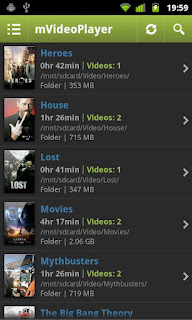
mVideoPlayer Pro v2.9.3 APK


Features:
Subtitle Support: srt, ssa, ass, sub/idx, mpl, smi, txt, sub, sami.
Internal MKV Subtitle (srt, ssa, ass), ONLY usefull on devices that supports playback of MKV.
On-screen information such as time and battery.
Responsive, intuitive controls.
Built-in subtitle search powered by OpenSubtitles.org, download and pair a subtitle with a video in less than 10 seconds.
Video library with movie posters & inbuilt poster search.
Imdb.com search, view information about your movie fast and easy directly within the app.
Three listing opions: With posters, thumbnails or clean & simple.
A lot of options for you to tweak to make the app fit your needs perfectly.
What's in this version: (Updated : May 14, 2012)
Fixed bug with missing menu button on some devices.
Bug fix, SMI subtitle parser.
HW acceleration for honeycomb.
Required Android O/S : 2.2+

Download

Shot Control v2.3.4 APK


A camera app designed to help serious photographers take better photographs. Shot Control allows photographers to better control, monitor, and manage the Android photography experience.
The users describe it best...

Features:
Multiple Touch Focus/Meter regions on ICS (on supported devices with Android 4.0)
Direct access to exposure control and zoom
One tap access to ISO, White Balance, Scene Modes, Focus Modes, and Flash Mode Settings (based on device abilities)
Custom mapping for hardware buttons (like volume down for focus, volume up for shutter)
Pre-focus function
35mm style film roll integrated with the viewfinder display
Star your favorite photos, which will be added to their own "Stars - Shot Control" group in the stock gallery app on most phones.
With "Instant Upload" enabled in Google+, photos with stars will be "instant uploaded" to G+/Picasa as if they were taken with the stock camera app.
What's in this version : (Updated : May 15, 2012)
Added Histogram...by popular request..additional support to come. ISO fixes for more devices. Still working on ISO for Galaxy Note.
Required Android O/S : 2.1+

Download

Beautiful Live Weather LWP HD v1.09 APK


Change the climate depends of your mood or use automatic mode.
All permissions needed to enable international automatic weather and time of the day.
Please remember that an international weather service is used and the forecast is approximate.

Options:
A wide range of ten display variations can be set in an automated or manual update mode.
Beautiful weather effects ranging from rain, wet snow, sun, clouds, air temperature can be displayed in Celsius or Fahrenheit.
Effects like smoke, meteor, stars, birds, dirigible, boat, and time of the day are reflected automatically through out the day.
Captivating landscape with gracious tall mountains and deep blue ocean, breathtaking freely floating clouds on your screen. A dirigible is freely drifting through the sky. Enjoy live updates of the weather forecast and watch the scenery reflect the changes from a bright sunny day to fragile snowflakes and enormous moon in the background. A customized approach with myriads of variations to admire for a keen eye.

What's in this version : (Updated : May 13 2012)
Black screen fixed.
Atmospheric pressure and humidity added.
bugs fixed.
Display font changed.
Day and night mode bugs fixed.
Required Android O/S : 2.1+

Download

Anatomy 3D Pro - Anatronica v1.39 APK


A free 3D educational guide to the human skeletal and muscular anatomy featuring an advanced interactive 3D touch interface. Wikipedia and Grays anatomy info available. Since 1.19 version you can test your knowledge of anatomy by using built in quiz!

This tablet and phone app allows for easy navigation of the skeletal and muscular system. The intricate connections and alignments amongst various organs such as the bones of the skull are much easier to understand and remember with the anatomically correct and detailed 3D model. Human body is a complicated three dimensional structure and different means of navigating and selecting objects are provided in order to make it easier to view the organs of interest from the preferred vantage point. In order to speed up the learning experience organs are grouped into a hierarchical and medically known sets. A hierarchy browser allows for quick highlighting and navigation of these sets, subsets and finally organs themselves. The tablet touch interface is perfectly integrated into the browsing and navigation experience and allows for intuitive manipulation of objects within the view. Once an organ has been selected a single touch of a button can increase or decrease the number of surrounding organs.

Entering the name of an organ into the search bar allows for fast selection and view focus on that organ. Other buttons are available for increasing and decreasing the number of surrounding organs according to their level in the medical hierarchy. Individual organs can also be hidden or made transparent. Multiple interface options allow for easy and fast organ selection and visibility settings while the intuitive touch interface allows for quick adjustment of the viewing angle. We hope that you enjoy and spread the word about our free educational anatomy offering. With your support we can offer more body systems in the future. Built with Unity3D. Human anatomy,anatomy 3d, human body in 3d,explore human body.

What's in this version: (Updated : May 15, 2012)
circulatory system added
new anatomy systems added
Required Android O/S : 2.1+

Download

Infinite Painter v1.5 APK


This app offers a multitude of brushes designed to replicate realistic mediums. It offers a variety of features built to optimize and streamline the workflow of the artist. It works well with Infinite Design, allowing the user to export their projects from Infinite Design into Infinite Painter with the click of a button.

It has five different types of symmetries you can use (X-Axis, Y-Axis, Arbitrary Angle, Radial, and Kaleidoscopic). It utilizes a smart menu system and a fluid interface, seeking to make work flow on the go much easier.

Navigation is as easy as putting two fingers on the screen and dragging the canvas or pinching to zoom. The auto save feature also comes in handy, automatically saving your layers and reloading them when you return. You can save your project, and all of your layers stay intact. You can also export your image with or without the background.
Besides these fundamental necessities, Infinite Painter also offers image importing in four different ways (Camera, Gallery, Google Image Search, and the current painting itself). After importing an image, you can translate, re-size, rotate, flip or recolor it to your liking. You then have the option to either stamp or rub the image onto the canvas. Infinite Painter also provides a dedicated blending button, allowing you to switch easily from painting to blending as you bring your artwork to life.

Suggested workflow: I usually like to take advantage of Infinite Design's limitless canvas in creating my design and laying out my artwork, then I use Infinite Design's Export-to-Painter feature to bring it in and start painting on a layer beneath the line-art. This approach takes advantage of the flexibility offered by Infinite Design and also the complexity offered by Infinite Painter.

Features:
Added a Blend Wheel. You can now control the smudge strength and lighten or darken while blending.
Added a new three-dimensional tube brush.
Redesigned the Symmetry dialog into a Symmetry Wheel.
Added double tap to fullscreen the painting. Double tap again to return back to where you were.
Fixed many glitches and FC issues some customers were having.
What's in this version: (Updated : May 15, 2012)
You can now fill in an area with color by longpressing on the screen.
Added a layer transformer.
Added a Blend Wheel. You can now control the smudge strength and lighten or darken while blending.
Required Android O/S : 2.1+

Download

n7player Music Player v1.2.1 full apk


n7player is an innovative 3D mp3 and music player available only on Android. It visualizes your music as a single plane full of album covers. You can zoom in and out using multi-touch to see different views of your music.

The main application screen is like an interactive tag cloud which can be easily explored to find your mp3 files. Artist names transforms smoothly to album covers, when pinched-to-zoomed. The minimalistic design and smooth interface allows users to quickly pick their favorite music from their library.

n7player has also the most advanced cover art downloading function available on the market. It can download the missing album arts both by its own and by easy to use dedicated screen, where the user can search and pick an album art from the internet.

Android 2.3+ is required to use Equalizer & other sound effects.

Reading sensitive log data permission is required only to provide more information in case of application crash when user decides to send log to developers.

This is time limited trial version. n7player Full Version Unlocker is available on Google Play.

Features:
Unique user interface, based on OpenGL, consisting of innovative, fully multi-touchable album covers wall
Intuitive music catalog showing: albums, artists, genres etc.
5 band graphic equalizer with presets, environmental effects, bass boost and sound virtualization technology (SRS/Dolby Surround) – requires Android 2.3 or higher
Supported audio formats are: mp3, mp4, m4a, m4p, ogg, wma, wav, aac, 3gp, mid, xmf, ogg, mkv(4.0+),
Easy to use automatic and manual album art and artist image downloader for your music
Tags editor for all supported audio formats (mp3 – both id3v1(.1) and id3v2(.4))
Configurable directory filters and powerful file browser for browsing your SD card
Home widgets, of two sizes – 1x4 and 2x4. Medium widget features repeat and shuffle buttons. More widgets will be added in upcoming releases
Lockscreen widget with direct unlock option
Sleep timer
Shuffle/repeat options for better control of your music playback
What's in this version : (Updated : May 15, 2012)
Stability improvements
Brand new landscape mode
Minor graphic changes accross whole application
Current Queue can now be saved as playlist (available from Playlist menu)
Official forum available at our web site
Required Android O/S : 2.2+

Download

Twitter Delicious Facebook Digg Stumbleupon Favorites More

 
Design by Free WordPress Themes | Bloggerized by Lasantha - Premium Blogger Themes | Best Web Host